
- pMarineViewer
- uHelmScope
- Geometry Utilities
- uTimerScript
- pContactMgrV20
- uProcessWatch
- uLoadWatch
- pNodeReporter
- uXMS
- uSimMarineV22
- pMissionHash
- pMissionEval
- pHostInfo
- uPokeDB
- uQueryDB
- uMayFinish
- pEchoVar
- pDeadManPost
- pObstacleMgr
- iSay
- pRealm
- pSearchGrid
- pSpoofNode
- uTermCommand
- uSimCurrent
- uFldNodeBroker
- uFldShoreBroker
- uFldNodeComms
- uFldMessageHandler
- uFldBeaconRangeSensor
- uFldContactRangeSensor
- uFldCollisionDetect
- uFldCollObDetect
- uFldObstacleSim
- uFldScope
- uFldPathCheck
2.680 Competition Apps

pSpoofNode: Spoofing Node Reports for Non-Existing Vehicles
Maintained by: mikerb@mit.edu  Get PDF
src: project-pavlab/appdocs/app_pspoofnode
1 Overview
2 Configuration Parameters for pSpoofNode
3 Publications and Subscriptions for pSpoofNode
3.1 Variables Published by pSpoofNode
3.2 Variables Subscribed for by pSpoofNode
3.3 Command Line Usage of pSpoofNode
4 Terminal and AppCast Output
1 Overview
Note: This app added to MOOS-IvP after Release 24.8.
The pSpoofNode application is a tool for generating node report messages, as if they were being generated by vessels running pNodeReporter. By using this app, one or more node reports can be generated for some set initial position, heading and speed, for some duration, before they cease to be posted. In this way, applications like the helm and contact manager can be tested in a number of high contact volume edge cases to ensure correct operations, including memory management and CPU load. Typically this process is run on the shoreside MOOS community.
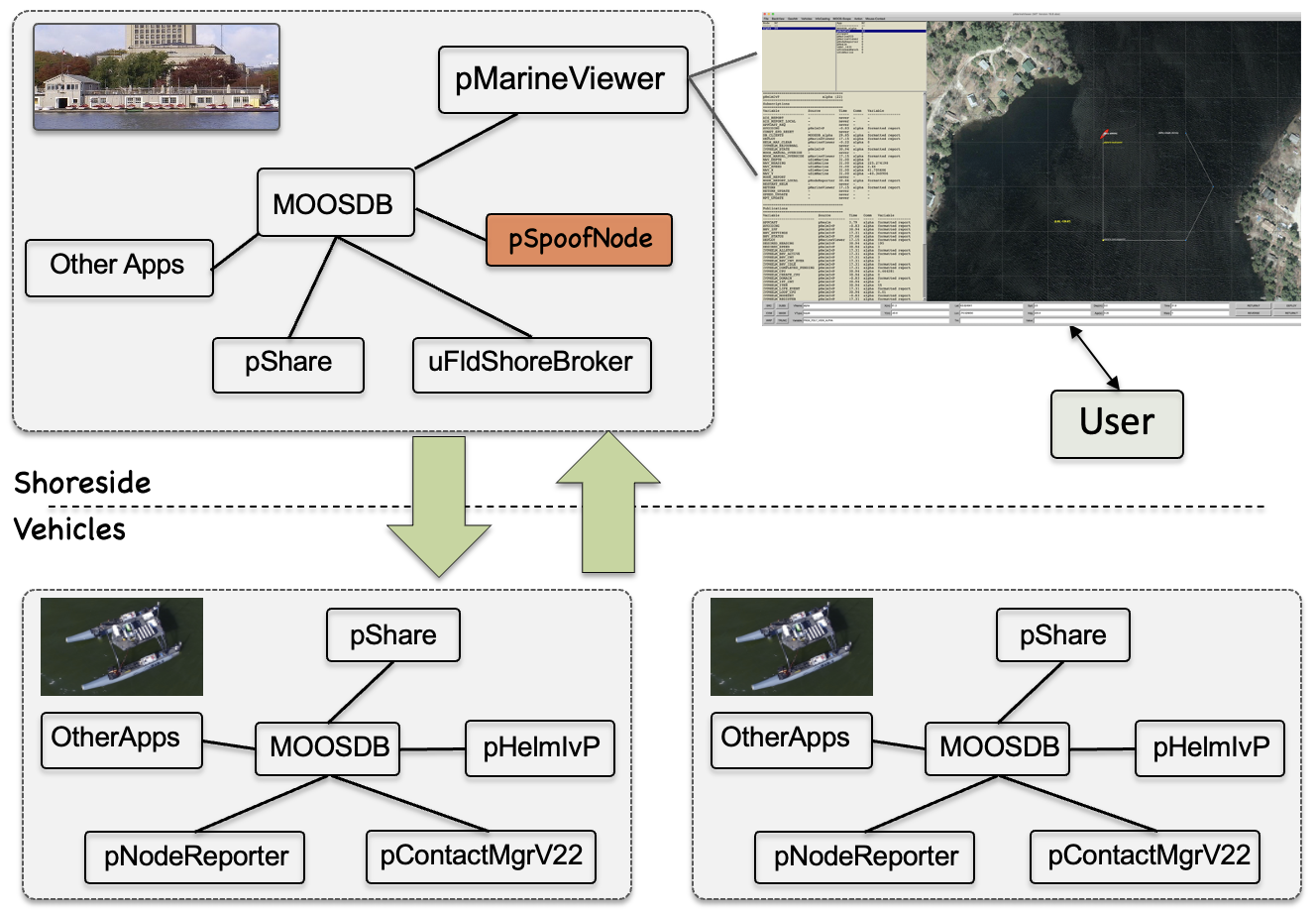
Figure 1.1: Typical pSpoofNode Topology: Node reports are generated in the shoreside community, and they are routed to all connected vehicles typically through the uFldNodeComms application.
2 Configuration Parameters for pSpoofNode
The pSpoofNode application may be configured with a configuration block within a MOOS mission file, typically with a .moos file suffix. The following parameters are defined for pSpoofNode.
Listing 2.1 - Configuration Parameters for pSpoofNode.
| default_length: | The default length of the vehicle in meters, if no vehicle length is specified in the spoof request. The default value is 5. |
| default_vtype: | The default vehicle type posted in the node report, if no vehicle type is specified in the spoof request. The default value is kayak. |
| default_group: | The default vehicle group posted in the node report, if no vehicle group is specified in the spoof request. The default value is the empty string, since the group field is optional in node reports. |
| default_vsource: | The default vehicle source posted in the node report, if no vehicle source, e.g, AIS or radar, is specified in the spoof request. The default value is the empty string, since the vsource field is optional in node reports. |
| default_color: | The default vehicle color posted in the node report, if no vehicle color is specified in the spoof request. The default value is purple. |
| default_heading: | The default vehicle heading posted in the node report, if no vehicle heading is specified in the spoof request. The default value is 45. |
| default_spd: | The default vehicle speed posted in the node report, if no vehicle speed is specified in the spoof request. The default value is 2. |
| default_duration: | The default duration, in seconds, for posting a series of node reports for a contact, if the duration is not specified in the spoof request. The default value is -1, meaning node report, if no vehicle speed is specified in the spoof there is unlimited duration. |
| refresh_interval: | A minimum interval between node report publications. In seconds. The default is 1. Another way to slow down publications is with the AppTick, but this will also slow down the processing of new spoof requests. |
| spoof: | A spoof request comprised of the fields found in a node report. The request must contain the vehicle position. All other fields are optional, relying on default values if a field is not specified in the spoof request. If the name is not specified, an auto-generated name will be used, beginning with "C" followed by an index incremented with each spoof request. Note: a spoof request may also be made through an incoming posting to the MOOS variable SPOOF. |
An Example MOOS Configuration Block [top]
An example MOOS configuration block may be obtained from the command line with the following:
$ pSpoofNode --example or -e
Listing 2.2 - Example configuration of the pSpoofNode application.
[[#lst_psn_econfig]]
  1  ===============================================================
  2  pSpoofNode Example MOOS Configuration
  3  ===============================================================
  4
  5  ProcessConfig = pSpoofNode
  6  {
  7    AppTick   = 4
  8    CommsTick = 4
  9
 10    refresh_interval = 1         // Secs, default = 1
 11    default_length = 5           // Meters, default = 5
 12    default_vtype =              // Shape, default = kayak
 13    default_group =              // Default = ""
 14    default_vsource =            // Default = ""
 15    default_color =              // Default = purple
 16
 17    default_hdg = 45             // Degrees, default=45
 18    default_spd = 2              // M/sec, default=0
 19    default_duration = 0         // Sec, default=0, never expire
 20  }
3 Publications and Subscriptions for pSpoofNode
The interface for pSpoofNode, in terms of publications and subscriptions, is described below. This same information may also be obtained from the terminal with:
$ pSpoofNode --interface or -i
3.1 Variables Published by pSpoofNode [top]
- NODE_REPORT: A node report representing the spoofed node.
3.2 Variables Subscribed for by pSpoofNode [top]
The pSpoofNode application subscribes to the following MOOS variables:
- APPCAST_REQ: A request to generate and post a new apppcast report, with reporting criteria, and expiration.
- SPOOF: A request for generating a spoofed node.
- SPOOF_CANCEL: A request to cancel an ongoing spoofed node, based on vehicle name or group name.
Example SPOOF requests:
   SPOOF = x=12,y=9,hdg=180,spd=0.1,name=zed,group=blue_team,type=kayak,
           vsource=ais,len=5,color=green,dur=20
   SPOOF = x=12,y=9,hdg=180,spd=0.4
Example SPOOF_CANCEL requests:
   SPOOF_CANCEL = vname=zed
   SPOOF_CANCEL = group=redteam
3.3 Command Line Usage of pSpoofNode [top]
The pSpoofNode application is typically launched with pAntler, along with a group of other modules. However, it may be launched separately from the command line. The command line options may be shown by typing:
$ pSpoofNode --help or -h
Listing 3.1 - Command line usage for the pSpoofNode tool.
[[#psn_usage]]
   1  Usage: pSpoofNode file.moos [OPTIONS]
   2
   3  Options:
   4    --alias=<ProcessName>
   5        Launch pSpoofNode with the given process
   6        name rather than pSpoofNode
   7    --example, -e
   8        Display example MOOS configuration block
   9    --help, -h
  10        Display this help message.
  14    --interface, -i
  15        Display MOOS publications and subscriptions.
  16    --version,-v
  17        Display the release version of pSpoofNode.
  18    --web,-w
  19        Open browser to: https://oceanai.mit.edu/ivpman/apps/pSpoofNode
  20
  21  Note: If argv[2] is not of one of the above formats
  22        this will be interpreted as a run alias. This
  23        is to support pAntler launching conventions.
4 Terminal and AppCast Output
Some useful information is published by pSpoofNode to the terminal on every iteration. An example is shown in Listing 4.1 below. This application is also appcast enabled, meaning its reports are published to the MOOSDB and viewable from any uMAC application or pMarineViewer. The counter on the end of line 2 is incremented on each iteration of pSpoofNode, and also serves as a heartbeat indicator. The "0/0" also on line 2 indicates there are no configuration or run warnings detected.
Listing 4.1 - Example terminal or appcast output for pSpoofNode.
[[#lst_psn_appcast]]
  1  ===================================================================
  2  pSpoofNode shoreside                                       0/0(228)
  3  ===================================================================
  4  Config:
  5    Default Type:    kayak
  6    Default Color:   dodger_blue
  7    Default Group:
  8    Default VSource:
  9    refresh Interv:  1
 10
 11  Postings: 36
 12
 13  VName  XPos  YPos    Hdg  Spd  Age
 14  -----  ----  ------  ---  ---  ----
 15  ben    36.7  -107.9  0    0    12.1
Document Maintained by: mikerb@mit.edu
Page built from LaTeX source using texwiki, developed at MIT. Errata to issues@moos-ivp.org. Get PDF