
General Topics
Swarm Toolbox Apps
- pTaskManager
- pMediator
- pEncircle
- uFldVoronoi
- uFldConvoyEval (TBD)
- uFldTaskMonitor (TBD)
- pSpoofNode

MOOS-IvP-Swarm Missions
Swarm Toolbox Behaviors
Utilities
- alogmtask (TBD)
- The pickpos utility
Docker labs
uFldVoronoi: Rendering Multi-Vehicle Voronoi Partitions
Maintained by: mikerb@mit.edu  Get PDF
1 Overview
2 Configuration Parameters of uFldObstacleSim
2.1 An Example MOOS Configuration Block
3 Publications and Subscriptions for uFldVoronoi
3.1 Variables Published by uFldVoronoi
3.2 Variables Subscribed for by uFldVoronoi
4 Terminal and AppCast Output
1 Overview
The uFldVoronoi application is a tool for rendering a Voronoi partition of one or more convex polygons, given set of vehicle positions. In typical applications using a Voronoi autonomy behavior, each vehicle may have its own view of its local Voronoi cell. This view may be based on outdated or limited information about neighbor positions. This may be due to latency, range limitations, frequencey limitations, or all of the above, for inter-vehicle communicatins. The uFldVoronoi app, on the other hand may have a more up-to-date set of vehicle locations by virtue of being on the shoreside. Thus it is presumed to be closer to "ground truth", and renders the Voronoi position based on this information.
The setup overview is depicted in Figure 1.1:
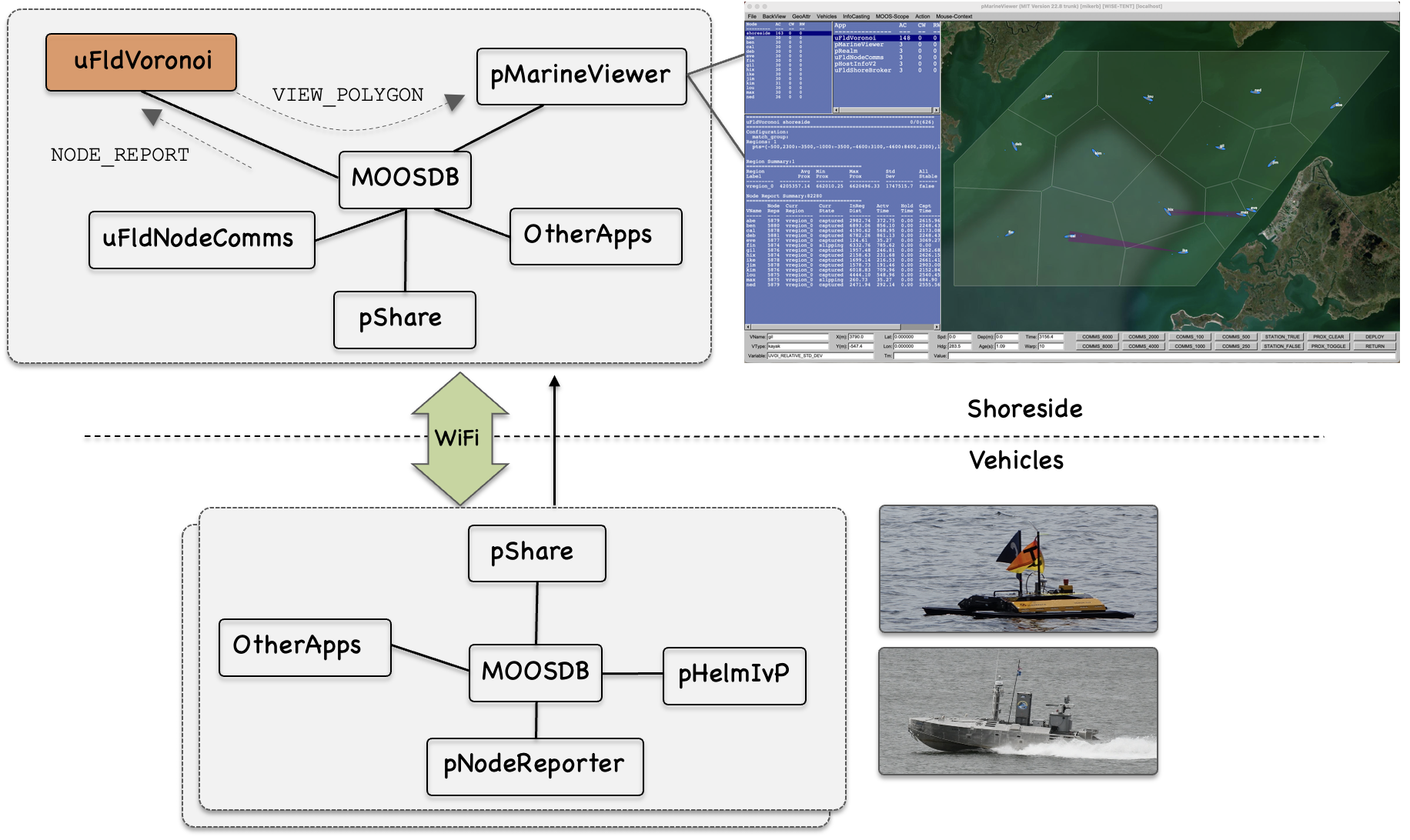
Figure 1.1: The uFldVoronoi: The uFldVoronoi app resides on the shoreside and ingests and maintains ground truth vehicle position state. Local Voronoi cells are calculated and published as viewable polygons for consumption by pMarineViewer.
2 Configuration Parameters of uFldObstacleSim
The following parameters are defined for uFldObstacleSim. For some parameters, more detailed description are provided in other sections. Parameters having default values are indicated so.
Listing 2.1 - Configuration Parameters for uFldObstacleSim.
| region: | The overall surrounding convex polygon region. |
| prox_edge_color: | Color of Voronoi cell edge color. Default is gray90. |
| prox_vertex_color: | Color of Voronoi cell polygon vertices. Default is green. |
| prox_fill_color: | Color of Voronoi cell internal fill. Default is green. |
| prox_label_color: | Color of Voronoi cell labels. Default is white. |
| match_group: | If specified, vessels must match this group name if it is to be included in the Voronoi decomposition. |
| poly_duration: | Duration, in seconds, associated with the posted polygon for rendering a Voronoi cell. The default is 100 seconds. |
| use_unc_reports: | If true, obtain node reports from the NODE_REPORT_UNC variable instead of NODE_REPORT. This is done in cases of high time warp and high number of contacts, to reduce load. See the documentation for uFldNodeComms. |
| load_summary: | If specified, a summary report will be posted to this MOOS variable. |
2.1 An Example MOOS Configuration Block [top]
To see an example MOOS configuration block, enter the following from the command-line:
$ uFldVoronoi --example or -e
This will show the output shown in Listing 2.2 below.
Listing 2.2 - Example configuration for uFldVoronoi.
  1  ===============================================================
  2  uFldVoronoi Example MOOS Configuration
  3  ===============================================================
  4
  5  ProcessConfig = uFldVoronoi
  6  {
  7    AppTick   = 4
  8    CommsTick = 4
  9
 10    stale_time    = 5    // Default (in seconds) is 5
 11    poly_duration = 100  // Default (in seconds) is 100
 12
 13    region      = 0,0: 150,0:200,-100:175,-275:-25,-275:-75,-150
 14    match_group = blue_team
 15
 16    use_unc_reports = true
 17
 18    prox_edge_color = <color>  // Default is gray90
 19    prox_fill_color = <color>  // Default is green
 20    prox_vert_color = <color>  // Default is green
 21    prox_edge_color = <color>  // Default is gray90
 22    prox_label_color = <color> // Default is green
 23}
3 Publications and Subscriptions for uFldVoronoi
The interface for uFldVoronoi, in terms of publications and subscriptions, is described below. This same information may also be obtained from the terminal with:
$ uFldVoronoi --interface or -i
3.1 Variables Published by uFldVoronoi [top]
The primary output of uFldVoronoi to the MOOSDB is posting of sensor reports, visual cues for the sensor reports, and visual cues for the hazard objects themselves.
- APPCAST: Contains an appcast report identical to the terminal output. Appcasts are posted only after an appcast request is received from an appcast viewing utility.
- VIEW_POLYGON: A visual artifact for rendering a a ground truth obstacle polygon.
- LOAD_SUMMARY: If the load_summary configuration parameter is set to the MOOS variable named LOAD_SUMMARY, then the load summary report published to this variable.
- UVOI_REPORT:
Example postings:
  LOAD_SUMMARY = warp_elap=202.05,real_elap=13.47,all_reps=2926,node_reps=2926,  [=\=]
                 unc_reps=0,all_reps_rate_real=217.2,all_reps_rate_warp=14.5,    [=\=]
                 unc_reps_rate_real=0.0,unc_reps_rate_warp=0.0,                  [=\=]
                 node_reps_rate_real=217.2,node_reps_rate_warp=14.5,polys=1,     [=\=]
                 fields=1,evaluators=1,mstate_logs=1
  UVOI_REPORT  = avg_area=55.5,min_area=45.2,max_area=89.3,std_dev=3.4,rel_std_dev=2.4,\
                 label=vregion_0
  VIEW_POLYGON = pts={48,-77:52,-80:52,-86:48,-89:43,-89:39,-86:39,-80:43,-77},  [=\=]
                 label=ob_4,label_color=invisible,edge_color=gray50,vertex_color=gray50, [=\=]
                 fill_color=white,vertex_size=1,edge_size=1,fill_transparency=0.15
3.2 Variables Subscribed for by uFldVoronoi [top]
The uFldVoronoi application will subscribe for the following MOOS variables:
- APPCAST_REQ: A request to generate and post a new apppcast report, with reporting criteria, and expiration.
- BVOI_STATE: The status from certain vehicle's perspective, including the vehicle name, the state (activated, capture, slipping), and the distance traveled thus far.
- VOI_REGION_POLY: Dynamically set the overall region polygon, which is otherwise set via the configuration parameter region.
- NODE_REPORT: A report on a vehicle location and status.
- NODE_REPORT_UNC: A report on a vehicle location and status.
Example postings:
  BVOI_STATE = vname=cal,state=captured,activated_dist=14.4
  VEHICLE_CONNECT = true
Command Line Usage of uFldVoronoi [top]
The uFldVoronoi application is typically launched as a part of a batch of processes by pAntler, but may also be launched from the command line by the user. To see command-line options enter the following from the command-line:
$ uFldVoronoi --help or -h
This will show the output shown in Listing 3.1 below.
Listing 3.1 - Command line usage for the UFldObstacleSim tool.
  1  ===============================================================
  2  Usage: uFldVoronoi file.moos [OPTIONS]
  3  ===============================================================
  4
  5  SYNOPSIS:
  6  ------------------------------------
  7    A shoreside tool maintaining a current state of all vehicles
  8    reporting node reports to the shoreside. It will repeatedly
  9    build a Voronoi decomposition of the given search region and
 10    generate a Voronoi polygon for each vehicle.
 11
 12  Options:
 13    --alias=<ProcessName>
 14        Launch uFldNodeComms with the given process
 15        name rather than uFldNodeComms.
 16    --example, -e
 17        Display example MOOS configuration block.
 18    --help, -h
 19        Display this help message.
 20    --interface, -i
 21        Display MOOS publications and subscriptions.
 22    --version,-v
 23        Display the release version of uFldNodeComms.
 24
 25  Note: If argv[2] does not otherwise match a known option,
 26        then it will be interpreted as a run alias. This is
 27        to support pAntler launching conventions.
4 Terminal and AppCast Output
The uFldVoronoi application produces some useful information to the terminal and identical content through appcasting. An example is shown in Listing 4.1 below. On line 2, the name of the local community, typically the shoreside community, is listed on the left. On the right, "0/0(204) indicates there are no configuration or run warnings, and the current iteration of uFldVoronoi is 160. Lines 6-9 show the configuration.
Lines 12-31 reveal the current state of the app.
Listing 4.1 - Example uFldVoronoi console/appcast output.
  1  ===================================================================
  2  uMAC_1291:  Nodes (9)                       [GOOD-TREE] (20) PAUSED
  3  ===================================================================
  4  uFldVoronoi shoreside                                      0/0(160)
  5  ===================================================================
  6  Configuration:
  7    match_group:
  8  Regions: 1
  9    pts={-500,2300:-3500,-1000:-3500,-4600:3100,-4600:8400,2300},label=vregion_0
 10
 11
 12  Region Summary:1
 13  ======================================
 14  Region      Avg  Min   Max   Std  All
 15  Label      Prox  Prox  Prox  Dev  Stable
 16  ---------  ----  ----  ----  ---  ------
 17  vregion_0     0  0     0     0    false
 18
 19  Node Report Summary:11818
 20  ======================================
 21         Node  Curr       Curr       InReg    Actv    Hold  Capt
 22  VName  Reps  Region     State      Dist     Time    Time  Time
 23  -----  ----  ---------  ---------  -------  ------  ----  ------
 24  abe    1474  vregion_0  activated  5936.63  776.45  0.00  0.00
 25  ben    1479  vregion_0  slipping   1586.30  181.52  0.00  337.90
 26  cal    1478  vregion_0  slipping   5520.49  700.88  0.00  0.00
 27  deb    1476  vregion_0  captured   4407.15  544.62  0.00  70.53
 28  eve    1476  vregion_0  slipping   3382.93  433.57  0.00  312.65
 29  fin    1481  vregion_0  activated  4098.18  519.28  0.00  30.24
 30  gil    1478  vregion_0  slipping   5673.03  700.88  0.00  0.00
 31  hix    1476  vregion_0  activated  4096.47  534.38  0.00  242.07
Document Maintained by: mikerb@mit.edu
Page built from LaTeX source using texwiki, developed at MIT. Errata to issues@moos-ivp.org. Get PDF