
General Topics
Swarm Toolbox Apps
- pTaskManager
- pMediator
- pEncircle
- uFldVoronoi
- uFldConvoyEval (TBD)
- uFldTaskMonitor (TBD)
- pSpoofNode

MOOS-IvP-Swarm Missions
Swarm Toolbox Behaviors
Utilities
- alogmtask (TBD)
- The pickpos utility
Docker labs
pEncircle: Decentralized Group Balancend Encircling
Maintained by: mikerb@mit.edu  Get PDF
1 Overview
2 Configuration Parameters for pEncircle
2.1 An Example MOOS Configuration Block
3 Publications and Subscriptions of pEncircle
3.1 Variables Published by pEncircle
3.2 Variables Subscribed for by pEncircle
4 Terminal and AppCast Output
5 Simple Example Missions
1 Overview
The pEncircle app is designed to support a mission comprised of a group of vehicles, each encircling a common point with a common encircling radius. This output of this app will be a speed adjustment recommendation to ownship based the distance between ownship and the closest vehicle fore and aft of ownship on the circle.
This app assumes ownship is presently in an autonomy mode utilizing the Loiter behavior, and there is presently a collision avoidance behavior also actively ensuring against collisions between vehicles.
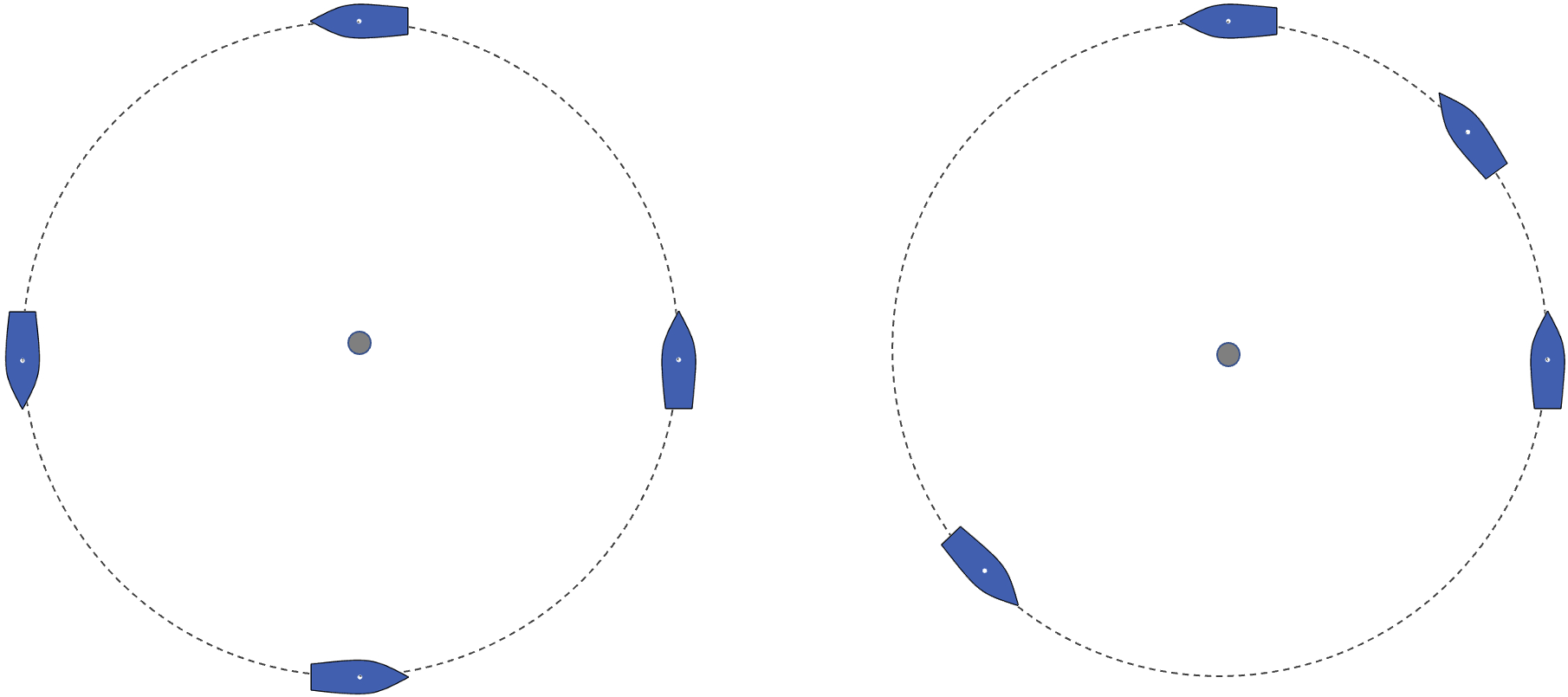
Figure 1.1: Balanced Encircling: Left: four vessels encircling a common point and common radius with equal spacing between vehicles. Right: four vessels encircling a common point with common radius, but with unequal spacing between vehicles.
The below are a pair of snippets from a four-vehicle simulation with, and without, the influence of pEncircle.

Figure 1.2: Balanced Encircling: Left: four vessels encircling a common point and common radius with equal spacing between vehicles. Right: four vessels encircling a common point with common radius, but with unequal spacing between vehicles.
2 Configuration Parameters for pEncircle
The following parameters are defined for pEncircle. A more detailed description is provided in other parts of this section. Parameters having default values are indicated.
Listing 2.1 - Configuration Parameters for pEncircle.
| circle_position: | The position and radius of the encircle polygon. |
| consider_thresh: | Contact range to the encircle polygon before accepting for consideration of speed modulation. |
| encircle_active: | If false, temporarily disable speed modulation. |
| group_speed: | Default group speed for traversing the encircle polygon. |
| max_speed: | Maximum speed for speed modulation output. |
| message_color: | Visual hint for confirming balanced position. |
| on_circle_thresh: | Threshold for a contact to be considered on the encircle polygon. |
2.1 An Example MOOS Configuration Block [top]
To see an example MOOS configuration block, enter the following from the command-line:
$ pEncircle --example or -e
This will show the output shown in Listing 2.2 below.
Listing 2.2 - A Simple pEncircle Example.
  1  ===============================================================
  2  pEncircle Example MOOS Configuration
  3  ===============================================================
  4
  5  ProcessConfig = pEncircle
  6  {
  7    AppTick   = 4
  8    CommsTick = 4
  9
 10    circle_position = x=75,y=-195,radius=50
 11    max_speed = 5
 12    aggression = 1
 13
 14    encircle_active = true
 15    consider_thresh = 30
 16    on_circle_thresh = 20
 17
 18    message_color = dodger_blue // any MOOS color or off
 19  }
3 Publications and Subscriptions of pEncircle
The interface for pEncircle, in terms of publications and subscriptions, is described below. This same information may also be obtained from the terminal with:
$ pEncircle --interface or -i
3.1 Variables Published by pEncircle [top]
The output of pEncircle is:
- APPCAST: Contains an appcast report identical to the terminal output. Appcasts are posted only after an appcast request is received from an appcast viewing utility.
- [LOITER_UPDATE]:
- [ENC_RNG_TO_CIRC]: Distance in meters between ownship and the encircle polygon.
- [ENC_SPD_FACTOR]: The ratio betwen closest fore distance minus the closest aft distance divided by the sum of the two.
- [ENC_DIST_FORE]: Distance in meters to the closest vehicle, fore of ownship and on the encircle polygon.
- [ENC_DIST_AFT]: Distance in meters to the closest vehicle, aft of ownship, and on the encircle polygon.
- [ENC_NEW_OS_SPD]:
- [ENC_DES_GRP_SPD]: The parameter setting for the set speed to settle on when vehicles are within a threshold of balanced distances.
The obstacle manager will also publish to whatever MOOS variables are specified in the obstacle alerts. See Section ???.
3.2 Variables Subscribed for by pEncircle [top]
The pEncircle application will subscribe for the following four MOOS variables:
- APPCAST_REQ: A request to generate and post a new apppcast report, with reporting criteria, and expiration.
- ENCIRCLE_ACTIVE: A Boolean string, when set to "false" will disable this app until reset to "true".
- ENCIRCLE_AGGRESSION:
- ENCIRCLE_GRP_SPEED: The set speed to settle on when vehicles are within a threshold of balanced distances.
- ENCIRCLE_MAXSPEED: A maximum speed to be posted as the vehicle set speed, in meters per second. Currently this feature is not in use.
- ENCIRCLE_POSITION: The position and radius of the circle.
- NODE_REPORT: The position, heading and speed of other vehicles in the group.
- NODE_REPORT_LOCAL: The position, heading and speed of ownship.
4 Terminal and AppCast Output
The pEncircle application produces some useful information to the terminal on every iteration of the application. An example is shown in Listing 4.1 below. This application is also appcast enabled, meaning its reports are published to the MOOSDB and viewable from any uMAC application or pMarineViewer. The counter on the end of line 2 is incremented on each iteration of pEncircle, and serves a bit as a heartbeat indicator. The "0/0" also on line 2 indicates there are no configuration or run warnings detected.
The output in the below example comes from the s1_alpha_obstacles mission.
Listing 4.1 - Example terminal or appcast output for pEncircle.
  1  ===================================================================
  2  pEncircle abe                                              0/0(799)
  3  ===================================================================
  4  Config:
  5  -----------------
  6    center_x:  75
  7    center_y:  -95
  8    radius:    45
  9    group spd: 4
 10    os_max_speed:     5
 11    on_circle_thresh: 20
 12    consider_thresh:  30
 13
 14  General State:
 15  -----------------
 16    activated:      true
 17    reports:        1454
 18    os_clockwise:   false
 19    os_ctr_clock:   true
 20    os_rng_to_circ: 0.3
 21
 22  Closest:
 23  -----------------
 24  closest_fore: cal
 25  closest_aft:  eve
 26  closest_fore_gap_spd: 0.1
 27  closest_aft_gap_spd:  -0.1
 28
 29  Contact    On  RangeTo  Reps   Rng    Rng    Clock
 30           Circ  Ownship  Total  Aft    Fore   -wise
 31  -------  ----  -------  -----  -----  -----  -----
 32  ben      true  86.9     269    116    166.8  ctr
 33  cal      true  51.8     267    227.9  54.9   ctr
 34  deb      true  85.1     309    172.5  110.3  ctr
 35  eve      true  54.7     282    58.5   224.2  ctr
 36
 37  closest fore: cal --> 54.8524
 38  closest aft: eve --> 58.4982
The first group of lines (4-12) show the configuration settings for pEncircle. The status of pEncircle is shown in Lines 14-38.
5 Simple Example Missions
The primary example missions using the pEncircle app:
- missions-swarm/S50-swarm_fence
- missions-swarm/S55-swarm_defend
Both are in the missions-swarm private repo:
git@github.com:pavlab-mit/missions-swarm.git
Document Maintained by: mikerb@mit.edu
Page built from LaTeX source using texwiki, developed at MIT. Errata to issues@moos-ivp.org. Get PDF